
How to Track a Flight in Real Time: A Beginner’s Guide to Delays, Connections & Airport Pickups
Not just “where’s the plane?” — a travel-day operating manual for reading delays, following the inbound aircraft, making connections, and timing a pickup.

Table of Contents
- Track a flight in 60 seconds
- What you’re actually tracking
- The four things to track
- What a tracker shows
- Why it isn’t perfectly live
- Which source to trust
- Choosing a tool
- Setting up before travel day
- Day-of-departure checks
- Tracking the inbound aircraft
- Interpreting a delay
- Tracking a connection
- Tracking for a pickup
- Tracking while onboard
- Limitations of trackers
- When there’s a problem
- Troubleshooting
- Case studies
- My personal routine
- Printable checklist
- FAQ
When you’re traveling, especially with kids, uncertainty about your flight details can be unnerving. Tracking your flight gives you a little more clarity, a little more control, and one less thing to worry about—so you can focus on keeping everyone calm, comfortable, and moving forward together.
I begin by checking the airline app, and within about a minute I can usually tell whether a trip is going to be trouble-free or whether I should start thinking about a backup plan — not because the map shows me a plane, but because I know how to read the information around the plane. That is the difference this guide is about. Anyone can see where an aircraft is. The skill worth having is knowing what that position means for your day: whether to leave for the airport at the normal time, whether a 30-minute delay is about to become a two-hour one, whether the person picking you up should get in the car yet.
The lowest-level question a tracker answers is “Where is the plane?” The question that actually helps you is “What does this information mean for my journey?” This article is built entirely around the second question.
One quick clarification. This is a guide to operational flight tracking — following a real flight on a real travel day. It is not about tracking airfare prices to find a cheap ticket. That is a completely separate skill with its own tools. (See my Google Flights price-tracking guide for that.)
Two kinds of tools run through this whole guide, and they do different jobs. The airline app manages your reservation — it is the only thing that can rebook you, confirm your gate, or issue a refund. A third-party tracker (like FlightAware or Flightradar24) explains what is probably happening around your reservation — most importantly, where the plane that will become your flight is right now. Neither one can make an airline run on time. Used together, and understood correctly, they turn travel day from something that happens to you into something you can see coming.
1. How to Track a Flight in 60 Seconds
If you are reading this in a hurry — maybe your flight is tomorrow, or someone just texted you a flight number — here is the fast version. The rest of the guide explains why each step matters.
Show the 60-second flight-tracking steps
- 1Find the airline code and flight number. It is on your ticket, printed as a two-letter code and a number — for example AA 100 or DL 215. That combination is your flight’s name.
- 2Confirm the date, departure airport, and destination. The same flight number flies most days, so a tracker needs the date and the two airports to show you the right one.
- 3Add the flight to the airline’s app using your confirmation code (usually six letters and numbers). This is the source that can actually manage your trip.
- 4Search for the flight in a third-party tracker (FlightAware or Flightradar24). This is where you follow the aircraft and, crucially, the inbound plane.
- 5Turn on the alerts that matter — in the airline app enable push, text, and email; in the tracker enable departure, delay, gate change, and arrival.
- 6Find the inbound aircraft. In FlightAware, look for the “Where is my plane?” link — it shows the physical plane scheduled to become your flight, and where it is right now.
- 7Confirm the gate through the airline or airport — not the tracker. Trackers are often late or blank on gates; the airline app and the airport’s own board are the truth.
- 8Keep following normal airport-arrival guidance unless the airline explicitly tells you otherwise. A tracker showing a late plane is not permission to leave home late.
The 60-second tool summary
| Job | Tool |
|---|---|
| Manage your reservation, rebook, official status | Your airline app |
| Follow the inbound aircraft & predicted departure | FlightAware (or similar) |
| See the plane on a visual map | Flightradar24 (or similar) |
| Local gates, terminals, departure boards | The airport’s official site or app |
| Whether an entire US airport is backed up | FAA — nasstatus.faa.gov / fly.faa.gov |
| Your refund & passenger rights (US) | US DOT — transportation.gov |
2. What Are You Actually Tracking?
Here is the idea that separates people who understand flight tracking from people who just stare at a map. It sounds almost too simple, but nearly every travel-day mistake comes from missing it:
When you buy a ticket, you buy a seat on a scheduled service — a flight number that departs a certain city at a certain time on certain days. But a flight number is not a physical object. It is a plan. The actual metal that shows up to fly that plan is a separate thing, and it changes constantly. The number 42 bus runs all day, but the specific bus at your stop right now is just whichever one the depot assigned this morning. Flights work the same way.
The terms you’ll keep running into, in plain English:
Show the key flight-tracking terms and codeshare example
- Scheduled flight — the planned service you bought: a flight number, route, and time. What your ticket describes.
- Flight number — the name of that scheduled service, like UA 328. The route.
- Physical aircraft — the actual airplane that will operate the flight today. The bus.
- Tail number (registration) — the unique ID painted on that specific plane, like N12345. The license plate.
- Operating airline — the company whose crew and aircraft actually fly the plane.
- Marketing airline — the company that sold you the ticket and put its code on it, sometimes a different company.
- Codeshare — the arrangement that makes the two above different: one airline sells seats on another airline’s flight under its own number.
That last pair trips up a lot of first-time trackers, so here is a concrete example:
Why does this matter so much on travel day? Three reasons: one aircraft flies several flights a day (your evening flight is only as on-time as the plane’s earlier day allows); airlines can swap the aircraft (the moment they do, the plane you were watching becomes irrelevant); and a delayed inbound aircraft is a clue, not a verdict (it raises the odds of a delay, it does not confirm one).
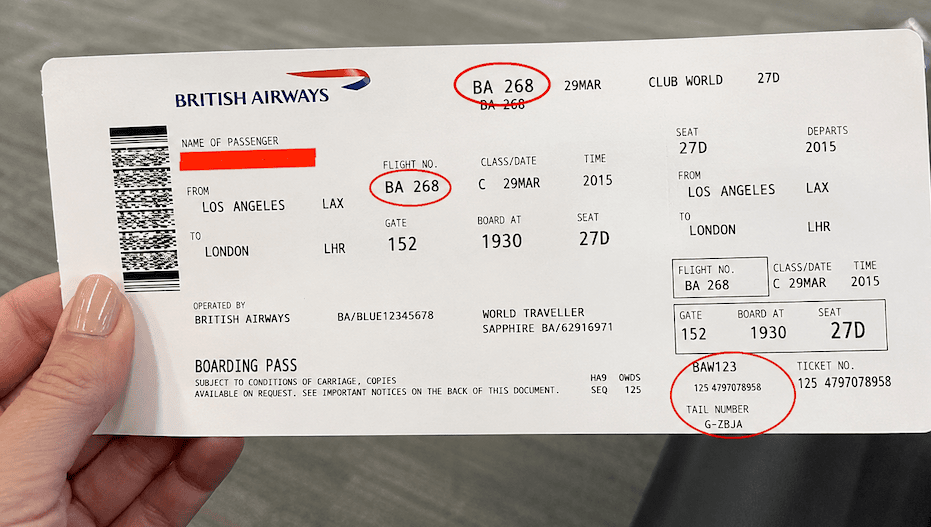
One physical flight, more than one number
Imagine a single Boeing 787 leaving Los Angeles for London tonight. On board that one aircraft, on that one journey, passengers hold tickets that read BA 268 (British Airways — the operating airline), AA 6165, IB 4602 (Iberia), and AY 5401 (Finnair). Four flight numbers, four airlines — one airplane, one tail number, one takeoff. If you booked through American but the tracker only lights up on the British Airways number, nothing is broken: you’ve found the operating flight, which is the plane itself. Always keep the operating flight number handy — it’s the one the tracking world runs on.
3. The Four Things to Track
Watching a plane icon is one input. To actually understand your travel day, track four things at once. Think of it as a little dashboard.
Show the four things to track
1. The flight
The scheduled service on your ticket — flight number, route, and time. Your reference point: “is this still going to happen the way it was sold to me?”
2. The aircraft
The physical plane currently assigned to operate your flight. Where is it right now — on its way, at the gate, or still stuck at an earlier city? Your single best early-warning signal, and the one most beginners never look at.
3. The system
Everything around the flight: departure airport, arrival airport, weather at both ends, airspace between, and any broader disruption like an FAA ground stop. A perfectly healthy plane can still sit for two hours because the system is jammed.
4. The alternative
Your backup: the next flight you could be rebooked onto, an alternative routing, a revised connection, or an adjusted pickup plan. You don’t need to act on it — you need to know it exists before you need it, because good alternatives fill up fast.
Here’s how the four work together during a delay. Your flight shows a 40-minute delay. Watching only the flight, you learn one number. But check the aircraft and you see the inbound plane hasn’t left its previous city — so the delay will probably grow. Check the system and the departure airport is under an FAA ground delay program — so it’s not your plane’s fault. Glance at the alternative and there’s one later flight with seats. You haven’t panicked and you haven’t done anything rash — but if that 40 minutes becomes two hours, you already know your move. That’s what tracking all four buys you: not a plane on a map, but a decision you can see coming.
4. What Information a Flight Tracker Shows
Open any flight’s page and you’re hit with a wall of times and numbers. Here’s what each means, why you should care, and — critically — whether it’s a confirmed fact or an estimate. Estimates change. Confirmed events don’t.
Show the flight-tracker information table
| Field | What it means | Why you care | Confirmed / estimated? |
|---|---|---|---|
| Scheduled departure | Original planned pushback time | Your baseline | Confirmed (fixed) |
| Estimated departure | Current best guess for pushback | Tells you when you’re really leaving | Estimated — moves |
| Actual gate departure | Time the plane really pushed back | Confirms you’ve genuinely left | Confirmed (after the fact) |
| Takeoff (wheels up) | Left the runway | Flight is truly underway | Confirmed (after the fact) |
| Estimated arrival | Predicted gate arrival | What pickups & connections live by | Estimated — moves |
| Landing (touchdown) | Wheels on the runway at destination | Down safely — passenger not off yet | Confirmed (after the fact) |
| Gate arrival (in) | Reached the gate, doors can open | The real “they’ve arrived” moment | Confirmed (after the fact) |
| Boarding | Gate has started boarding | Be at the gate; departure is close | Confirmed, timing can slip |
| Delayed | Running later than scheduled | Triggers your delay playbook | Status confirmed, length estimated |
| Diverted | Landing somewhere other than planned | Significant — call the airline | Confirmed |
| Cancelled | Will not operate | Rebook now; check refund rights | Confirmed |
| Terminal | Which terminal | Where to go; matters for connections | Usually confirmed, sometimes late |
| Gate | Specific boarding/arrival gate | Where to physically stand | Can be blank, late, or changed |
| Aircraft type | The plane model | Helps you spot a swap | Confirmed once assigned |
| Tail number | The specific plane’s registration | Lets you follow the exact inbound plane | Confirmed, can change on a swap |
| Altitude | How high it’s flying | Mostly for the map view | Observed (near-real-time) |
| Ground speed | Speed over the ground | Curiosity, not an action item | Observed (near-real-time) |
Notice the pattern: the times you most want to trust — estimated departure and estimated arrival — are exactly the ones that are predictions. Usually good predictions, but they move as new information arrives. Confirmed events (pushed back, wheels up, landed, at gate) are solid because they already happened.
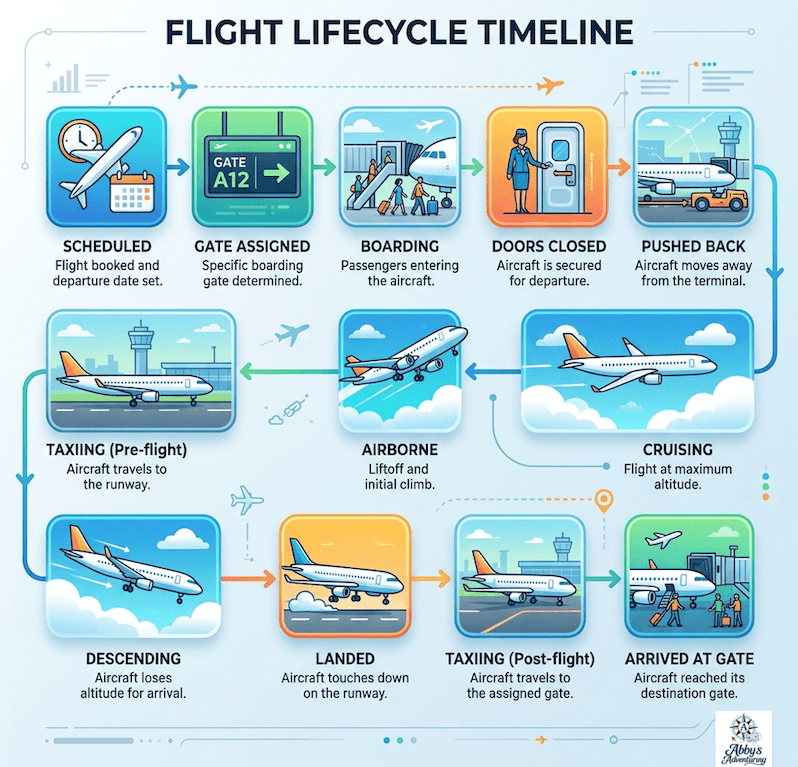
The flight lifecycle, in order
Every flight moves through the same sequence — so you always know roughly where in the journey your flight is:
Scheduled → gate assigned → boarding → doors closed → pushed back → taxiing → airborne → cruising → descending → landed → taxiing → arrived at gate
“Landed” is near the end of that list — but it is not the last step. “Arrived at gate” is. Keep your eye on the last box, not the second-to-last one.
Show the flight lifecycle image
5. How Flight Tracking Works — and Why It Isn’t Perfectly Live
You don’t need an engineering lesson to track a flight well. You need just enough to know why the numbers sometimes lie a little — so you make good decisions when they do.
Public flight trackers are near-real-time, not perfectly live. Think of a live sports score that updates every few seconds rather than a video feed. Most of the time the small delay doesn’t matter. Occasionally it does, and knowing it’s there keeps you from over-reacting.
A tracker builds your flight’s page by combining several different sources, not one: the position on the map comes from signals the aircraft broadcasts, picked up by a network of ground receivers (and satellites over oceans); the gate, terminal, boarding, and delay details come from airline and airport systems; the schedule and status framing comes from airline and, in some countries, government feeds.
Because those sources are separate, a few things follow naturally:
Show why flight-tracker data can differ or disappear
- Different pieces update at different times — the map may show the plane at the terminal before the “gate arrival” status catches up, or vice versa.
- Some positions are estimated. When a plane briefly leaves coverage, a tracker may draw a best-guess path rather than a live position.
- Coverage can drop out over oceans, remote areas, or at very low altitude near the ground. It reappears on re-entry.
- Arrival times are predictions — that neat “arrives 4:52 PM” is a model’s estimate, not a promise.
- Two apps can disagree without either being broken — different receivers, clocks, and prediction models.
6. Which Flight-Tracking Source Should You Trust?
When your phone is showing four different things across three apps, the question isn’t “which app is best?” It’s “for this specific question, who is the authority?” Here’s the hierarchy I use.
Show which flight-tracking source to trust
| Question | Best source |
|---|---|
| Is my reservation confirmed? | Airline app |
| Where should I board (gate/terminal)? | Airline app + the airport display |
| Where is the aircraft right now? | FlightAware, Flightradar24, or similar |
| Where is my inbound aircraft? | Third-party tracker or airline inbound feature |
| Is the whole airport delayed? | Official airport; in the US, the FAA |
| Can I change or rebook my ticket? | The airline |
| Am I owed a refund or assistance? | Official regulator (US: DOT) + airline policy |
| Is the arriving passenger ready for pickup? | A tracker + a direct message from the traveler |
What each source is good at — and where it’s weak: the airline app owns your reservation (status, gate, rebooking, refunds) but is sometimes slow to admit a delay and rarely shows the inbound aircraft well. A third-party tracker owns the aircraft (position, inbound plane, independent estimates) and often sees trouble first, but can’t rebook you and its gate data can be stale. The airport owns local truth (terminal, gate, the physical board) but only its own airport. The FAA owns the system picture (ground stops, ground delay programs) but not your seat. The regulator/airline policy owns your rights but isn’t real-time.
7. How to Choose a Flight-Tracking Tool
There’s no single “best flight tracker,” and any article that crowns one is answering the wrong question. The right tool depends on the task. So instead of a top-ten list, here’s a by-need guide.
Show how to choose a flight-tracking tool by need
- Quick status check — your airline app, a Google search of the flight number, or FlightAware.
- Managing your own booking — the airline app, full stop. Only it can rebook or refund.
- Tracking the inbound aircraft — FlightAware’s “Where is my plane?”, built exactly for this and free.
- Seeing the plane on a map — Flightradar24’s visual map is its signature strength.
- Monitoring a connection — a tracker showing both flights clearly, paired with the airline app.
- Tracking someone for a pickup — any tracker with a shareable link + gate-arrival & landing alerts.
- Frequent-traveler alerts — a paid tier if you want more saved alerts and history.
- Airport-wide disruptions — the FAA (US) or the airport’s own channel, not a plane app.
Features to weigh: web/iOS/Android availability, whether an account is required, free vs. paid, alert types and limits, map access, inbound-aircraft info, gates and terminals, historical data, ease of use, accessibility, privacy permissions, ad load, and subscription pricing.
The two names you’ll see most (verified July 2026)
- FlightAware. An unusually generous free tier covers what a traveler needs: real-time tracking, free alerts (departure, arrival, cancellation, gate change, delay, diversion), weather radar, saved favorites, and the standout “Where is my plane?” inbound feature — all free, on web, iOS, and Android. Paid tiers are aimed at aviation professionals, not travelers.
- Flightradar24. A free tier gives the live map with limits (ads, tracking timeouts). Paid plans run about Silver $5.80/mo (~$28.80/yr) and Gold $10.60/mo (~$78.80/yr), adding ad-free use, uninterrupted tracking, more alerts (Silver ~100), and longer history (Silver ~90 days, Gold ~365). A 7-day free trial is available. Web, iOS, Android.
Don’t treat either as universally “best.” For following the plane that becomes your flight, FlightAware’s free inbound feature is the star. For a rich live map, Flightradar24 shines. Most confident travelers keep both installed.
8. How to Set Up Flight Tracking Before Travel Day
The best tracking happens before anything goes wrong. Spend ten minutes 48–24 hours out and travel day gets dramatically calmer.
Show the pre-travel flight-tracking setup checklist
- Add your reservation to the airline app using your confirmation code.
- Verify your phone number and email so alerts can reach you.
- Turn on airline notifications — push, text, and email. If one channel fails you still hear about a gate change.
- Add the flight to a third-party tracker so you can follow the aircraft independently.
- Share the tracking link with your pickup person or family.
- Confirm departure and arrival terminals.
- Save the airline’s contact methods — app chat, phone, messaging.
- Screenshot your original itinerary — numbers, times, confirmation code, seat.
- Note one or two alternative flights — don’t book, just know they exist.
- Don’t over-read an early aircraft assignment — a tail number set days ahead can still change.
Which alerts matter depends on who you are. The traveler: cancellation, departure change, gate/terminal change, boarding. A pickup person: takeoff, landing, and especially gate arrival. A family member following along: cancellation, departure, arrival. A connecting passenger: everything on the first flight (especially estimated gate arrival and delay), plus boarding and gate for the second.
A reasonable default set: cancellation, departure-time change, gate/terminal change, boarding, inbound aircraft, takeoff, landing, and gate arrival. Turn off the ones that are just noise for your situation.
9. What to Check on the Day of Departure
Travel day has natural checkpoints. Here’s what to look at, and when.
Morning of travel
Check the airline status, whether an aircraft (tail number) is assigned yet, the inbound aircraft (Section 10), departure and arrival airport conditions, weather at both ends, your terminal, and a quick glance at alternate flights so you know your options still exist.
Before leaving home
Recheck the departure estimate, recheck terminal and gate, check for airport-wide disruption (in the US, a 20-second look at fly.faa.gov tells you if the whole airport is under a ground delay), then follow your normal airport-arrival timing.
I do not delay my airport arrival solely because a tracker shows a late plane. The downside of arriving on time to a delayed flight is a coffee and some waiting. The downside of arriving late to a flight that recovered is a missed trip. That math never changes.
At the airport
Use airport displays and the airline app for gate decisions (not the tracker, which lags), keep monitoring the inbound aircraft, watch for aircraft reassignment (if the tail number changes, your old plane no longer matters), keep notifications on and volume up, and stay near the gate once boarding could plausibly begin.
During boarding
A subtlety that surprises people: the plane being at the gate does not guarantee an on-time departure. Boarding can start and then stall. The remaining hold-ups can include crew (a member timing out or a connecting crew still arriving), maintenance, fueling, catering, baggage loading, paperwork (weight-and-balance), or an ATC ground hold even though your plane is ready. You usually can’t tell which from a tracker — and you shouldn’t guess. Don’t announce a cause unless the airline states it.
10. How to Track the Inbound Aircraft
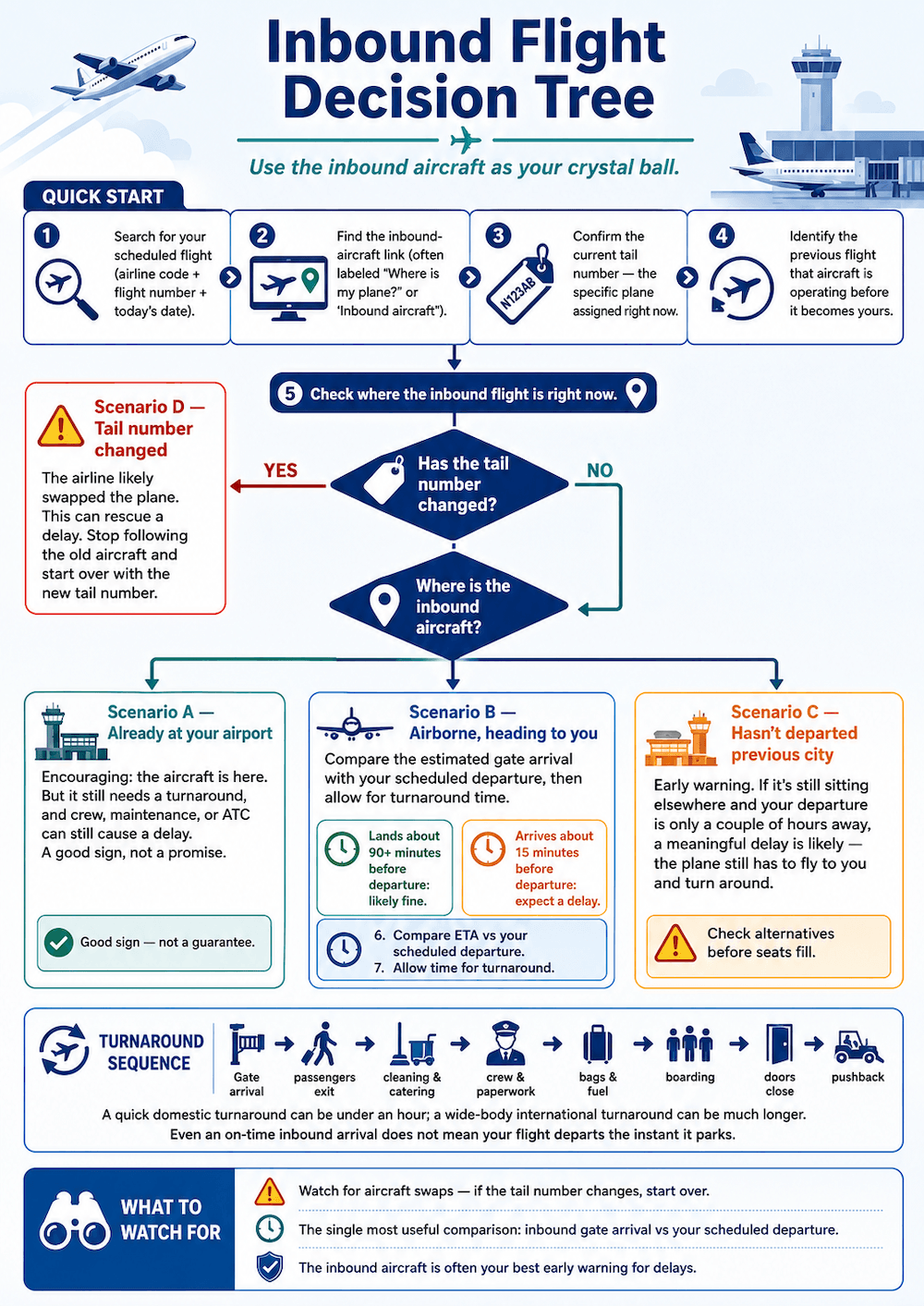
This is the most powerful, most underused skill in flight tracking. If your flight is delayed because the plane hasn’t arrived yet, the inbound aircraft is your crystal ball.
Show how to track the inbound aircraft
- 1Search for your scheduled flight (airline code + flight number + today’s date).
- 2Find the inbound-aircraft link. FlightAware calls it “Where is my plane?”; others say “inbound aircraft” or “aircraft’s previous flight.”
- 3Confirm the current tail number when shown — the specific plane assigned right now.
- 4Identify the previous flight that aircraft is operating before it becomes yours.
- 5Check where that inbound flight is: departed, taken off, landed, or at the gate?
- 6Compare its estimated gate arrival with your scheduled departure. This single comparison tells you most of what you need.
- 7Allow time for the turnaround — the plane can’t land and instantly re-depart.
- 8Watch for an aircraft swap — if the tail number changes, start over with the new plane.
Scenario A — the inbound plane is already at your airport
Encouraging: the aircraft exists and it’s here. But not a guarantee — it still has to be turned around, and crew, maintenance, or ATC can still cause a delay. A good sign, not a promise.
Scenario B — the inbound plane is airborne, heading to you
Now you can forecast. Look at its estimated gate arrival, compare to your scheduled departure, and add a realistic turnaround. Lands 90 minutes before you leave? Almost certainly fine. Estimated to arrive 15 minutes before departure? Expect a delay — there’s no way to turn a plane that fast.
Scenario C — the inbound plane hasn’t departed its previous city
The early-warning flare. If it’s still sitting elsewhere and your departure is a couple of hours out, a meaningful delay is now likely — it has to fly to you and turn around. This is the moment to look at alternatives, while seats still exist. When a delay begins to grow, I check alternate flights before they fill.
Scenario D — the tail number changes
The airline has probably swapped the plane — which can be good news, since a fresh aircraft can rescue a delayed flight. Stop following the old plane immediately; it’s no longer yours. Re-run the steps on the new tail number.
Show the inbound flight decision tree
11. How to Interpret a Flight Delay
“Delayed” is not one thing. A delay can be about to evaporate or about to double. The trick is reading the evidence. Here’s a ladder from weak to strong.
Weak evidence — don’t act, just watch
- The aircraft appears slightly behind schedule.
- Weather exists somewhere on the route (there’s almost always weather somewhere).
- The previous flight arrived a few minutes late.
Moderate evidence — start preparing; look at alternatives
- The inbound aircraft hasn’t departed its previous city.
- The estimated time keeps moving later in steps (a rolling delay).
- A gate disappears from the display.
- The airport has a broader delay program running.
- The airline begins offering voluntary changes — a quiet tell.
Strong evidence — act, this is real
- The airline confirms a delay or cancellation.
- The aircraft diverts.
- An official airport or FAA source reports a relevant ground stop.
- Your booking changes in the app.
- Gate staff give an operational update.
Rolling delays — why 30 minutes becomes 90. Airlines often post a delay in conservative increments as information firms up. First “delayed 30.” Then the inbound plane still hasn’t left: “delayed 60.” Then “delayed 90.” Each update reflects better information, not dishonesty — but if you see the estimate stepping later two or three times, treat the trend as the signal, not the latest single number.
Can a delay recover? Sometimes. Flights can claw back time through schedule padding, favorable winds, a shorter ATC routing, reduced taxi time, or a fast turnaround. But don’t count on recovery — treat any recovered time as a pleasant surprise, not a plan.
12. How to Track a Connecting Flight
Connections are where flight tracking earns its keep — and where the printed connection time lies to you. The core move: track both flights independently, and calculate the connection you actually have, not the one on the ticket.
For the first flight, monitor: estimated gate arrival (not just landing), arrival terminal, any delay, any diversion.
For the second flight, monitor: boarding time, the door-closing deadline (boarding usually ends ~10–15 min before departure), departure gate and terminal, its own inbound aircraft, and any current delay (a delay on the second flight can quietly save a tight connection).
That’s almost always less than the layover printed on your ticket. Here’s why, with a worked example:
Show the connecting-flight timing example
- First flight’s estimated gate arrival: 3:40 PM.
- Second flight departs 4:25 PM.
- Boarding doors close ~4:10 PM (about 15 min before departure).
- Terminal transfer takes ~15 minutes.
The ticket shows a 45-minute layover (3:40 to 4:25). But your practical margin is: 4:10 − 3:40 − 15 min = about 15 minutes. Not 45. That 15-minute reality is what you plan around — and if the first flight slips even slightly, it evaporates.
What a tracker cannot predict about your connection: how fast the plane actually deplanes (your row matters), immigration lines on an international arrival, security re-screening if you change zones, mobility or assistance timing, whether the airline will hold the second flight, or whether your checked bag makes the connection.
13. How to Track a Flight for an Airport Pickup
Picking someone up seems simple and is quietly the easiest thing to get wrong — because people leave based on the scheduled arrival or the word “Landed,” both of which mislead. For pickups, I monitor gate arrival, not runway touchdown, and I wait for a text before I commit to the curb.
How long the tail end takes depends entirely on the passenger:
Show typical airport pickup timing by traveler type
- Domestic, carry-on only: fastest — but still after taxi + deplaning, often 15–30+ min after touchdown at a busy airport.
- Domestic with checked luggage: add an unpredictable baggage-claim wait.
- International arrival: add immigration and customs — minutes to well over an hour.
- Needing mobility assistance: deplaning is often last — build in extra time.
- Unaccompanied minor: a deliberate, unhurried hand-over — expect a longer wait.
Show the airport pickup tracking steps
- 1Track the flight (a shared link from the traveler is ideal).
- 2Enable landing and gate-arrival alerts — you want both.
- 3Confirm the arrival terminal — pickup zones are terminal-specific.
- 4Monitor baggage-claim info when the app shows it.
- 5Have the traveler text you once they’ve deplaned — this single message beats any tracker.
- 6Use a cell-phone waiting lot if the airport has one — free, close, legal to wait in.
- 7Don’t circle the terminal repeatedly — stressful, often not allowed, and you’ll lap the airport before they’re down.
There’s no universal “arrive X minutes after landing” rule, because the tail end depends on all the factors above. The honest guidance: watch gate arrival, wait for the “I’m off the plane” text, and then head for the curb. For a domestic carry-on traveler that might be ~20 minutes after touchdown; for an international traveler with bags it could be an hour or more.
14. Can You Track Your Own Flight While Onboard?
Yes — sometimes — and it’s a nice way to pass the time. Three options, in rough order of reliability.
Seatback screen or airline moving map
The simplest and most reliable choice when available. It’s fed by the aircraft itself, needs no signal from you, and shows position, altitude, and time remaining. If it’s there, just use it.
Inflight Wi-Fi + a third-party tracker
If the plane has Wi-Fi, you can often open a normal tracker in your browser and watch your own flight like anyone on the ground. Whether it works — and whether it’s free — depends on the airline’s network. Some airlines offer free messaging or a free flight-info portal even when full internet is paid.
Offline GPS with downloaded maps (possible but unreliable)
Your phone’s GPS doesn’t inherently need cellular data or Wi-Fi — it can get a position from satellites directly. But reception inside a metal cabin is poor and inconsistent (a window seat helps a little). You must download offline maps before departure, keep airplane mode on (GPS works within airplane mode), and follow crew instructions above all.
15. The Limitations of Flight Trackers
A guide that only tells you what trackers can do sets you up to trust them too much. Here, candidly, is what they can’t. Read this as the counterweight to everything above.
What trackers can’t quite manage
Show the practical limitations of flight trackers
- Public tracking is near-real-time, not perfectly live — there’s a small lag.
- Updates can be delayed; what you see may be seconds to minutes old.
- Arrival estimates are predictions, not commitments.
- Gate information can be missing or late.
- Different apps can show different estimates at the same moment.
- The physical aircraft assignment can change without much warning.
- Coverage can be incomplete over oceans, remote areas, or near the ground; low-altitude aircraft may drop off the map.
- Some map positions are estimated (interpolated), not directly observed.
- A missing aircraft does not mean the authorities lost it — ATC’s systems are separate and robust.
What a tracker simply cannot confirm
Show what flight trackers cannot confirm
- The definitive cause of a delay (crew? maintenance? ATC? it can’t know).
- That a flight will be cancelled (it reflects cancellations after the fact; it can’t predict them).
- Your passenger rights — a regulator-and-policy question.
- Anything about managing your reservation — it can’t rebook or refund.
- How fast someone will clear customs or baggage claim.
Why trackers disagree with each other (so you don’t panic when they do): different data sources and receiver networks, different update clocks, different prediction models, airline figures vs. airport figures, and observed positions vs. estimated ones.
16. What to Do When Tracking Reveals a Problem
Your tracking told you something’s wrong — a growing delay, a cancellation, a broken connection. Here’s the prioritized playbook. Work down it in order.
Show what to do when a flight problem occurs
- 1Confirm the status through the airline — the tracker flagged it; the airline makes it official.
- 2Check alternative flights immediately, while seats exist.
- 3Evaluate connection risk if you have onward travel.
- 4Contact the airline (app chat, phone, or gate agent) — earlier is better.
- 5Ask about rebooking onto a specific alternative you’ve already spotted.
- 6Save screenshots and notifications — timestamps, statuses, alerts.
- 7Save receipts for meals, hotel, and transportation you incur.
- 8Check the airline’s commitments — many publish what they’ll cover for controllable delays.
- 9Review official refund and passenger-rights info (regulator, not a compensation-company blog).
- 10Inform hotels, drivers, or family whose plans depend on your arrival.
- 11Don’t make irreversible changes based only on a third-party estimate — confirm with the airline first.
Separately, the DOT’s airline customer-service commitments dashboard shows what each major US airline has promised (meals, hotels, rebooking) for delays and cancellations within its control.
Outside the US: consult the appropriate official regulator for your route — for example the relevant authority in the UK, the EU (where EC 261 governs delay and cancellation compensation), Canada, and so on. Rights vary significantly by jurisdiction. This guide is not legal advice; lean on the airline and the regulator rather than third-party compensation companies as your primary authority.
17. Troubleshooting Common Flight-Tracking Problems
Show common flight-tracking problems and fixes
“My flight number doesn’t appear.”
Check the date, the route, and whether you’re searching a codeshare number. If you booked through one airline but another operates it, search the operating carrier’s number.
“Several flights have the same number.”
Numbers repeat across days and sometimes routes. Pin it down with the travel date and both airports.
“The tracker shows a different airline.”
That’s the operating carrier on a codeshare. Same seat — just search the operating number.
“The plane disappeared from the map.”
Usually coverage (ocean, remote, low altitude), a recent landing, delayed data, or an estimated position the app paused. It’ll typically reappear — nothing is wrong.
“The gate is blank.”
Trackers are weak on gates. Use the airline app and the airport’s departure display.
“It says landed, but they haven’t contacted me.”
Normal. After landing there’s still taxi, gate arrival, deplaning, baggage, and (if international) customs — plus possibly weak cell signal. Wait for the text.
“One app says on time, another says delayed.”
Check the timestamps — one may be more recently updated — then apply the source hierarchy from Section 6: airline for official status, tracker for aircraft position.
“The incoming aircraft changed.”
The airline likely substituted a plane. Re-check the tail number and follow the new aircraft.
“The flight is delayed, but the plane is at the airport.”
A plane at the gate can still be held by crew, maintenance, fueling, catering, baggage, paperwork, or ATC restrictions. Present is necessary but not sufficient. Don’t assume a cause the airline hasn’t stated.
18. Real Traveler Case Studies
Show the real traveler case studies
Case study 1 — Normal domestic nonstop
A clean baseline. Record: scheduled departure, actual gate departure, takeoff, landing, gate arrival — plus the alert times from each tool (which app notified first, and by how much). Note what could be inferred vs. what couldn’t.
Case study 2 — Delayed inbound aircraft
The flagship example: show the inbound-aircraft method predicting a delay before the airline confirmed it. Record the inbound flight and its estimated gate arrival, the turnaround, the aircraft assignment (did the tail number hold or change?), the final departure, and whether the delay grew or recovered.
Case study 3 — Tight connection
Walk through the real practical-connection calculation on an actual itinerary: first flight’s estimated gate arrival, second flight’s boarding-door deadline, terminal-transfer time, the practical margin vs. the printed layover, what you did, and whether the bag made it.
Case study 4 — Airport pickup
On one real arrival, compare four moments: scheduled arrival, touchdown, gate arrival, curbside pickup. Domestic or international? Carry-on or checked? The gap between “Landed” and “at the curb” is the number that proves the callout.
Case study 5 — Conflicting sources
Document a real instance where the airline, the airport, and a third-party tracker disagreed: what each reported, and which turned out most useful for each decision (gate vs. aircraft position vs. rebooking).
For every case study, log: date, route, tools tested, timestamped observations, screenshots, what could reasonably be inferred, what could not be known, and what action was appropriate.
19. My Personal Flight-Tracking Routine
Before travel day
I add the reservation to the airline app, turn on every alert channel, and add the flight to. I screenshot the itinerary and note one backup flight.
On the morning of departure
I check the airline status first, then look for the assigned tail number and check the inbound aircraft.
Before leaving home
I compare the airline app’s estimate against the tracker’s, and — in the US — glance at the FAA map for airport-wide delays. I do not delay my airport arrival solely because a tracker shows a late plane.
At the airport
I prioritize gate and boarding alerts from the airline app, and keep the inbound aircraft open in the background.
During a delay
When a delay begins to grow, I check alternate flights before they fill, and I contact the airline while options still exist rather than waiting to see what happens.
During a connection
I track both flights independently and calculate the practical connection margin, not the printed one.
When arranging a pickup
For airport pickups, I monitor gate arrival rather than runway touchdown, and I wait for a text that the traveler is off the plane before heading to the curb.
20. Printable Flight-Tracking Checklist
A one-page version to save, screenshot, or print before you travel.
Before travel day
- Reservation added to the airline app
- Phone number and email verified for alerts
- Airline alerts on (push + text + email)
- Third-party tracker selected and flight added
- Tracking link shared with pickup person / family
- Departure and arrival terminals confirmed
- Original itinerary screenshotted
- One or two alternate flights noted
Before leaving home
- Flight status rechecked
- Terminal (and gate, if shown) rechecked
- Inbound aircraft checked
- Airport-wide conditions checked (FAA in the US)
- Normal airport-arrival timing followed
At the airport
- Gate monitored via airline app + airport display
- Boarding alerts active
- Aircraft assignment / tail number rechecked
- Alternatives still identified
During a delay
- Airline status confirmed (not just the tracker)
- Alternate flights checked early
- Receipts and screenshots saved
- Passenger rights reviewed (regulator source)
For connections
- First flight’s estimated gate arrival checked
- Second flight’s boarding-door deadline noted
- Terminal-transfer time calculated
- Both the second flight and its inbound aircraft tracked
For a pickup
- Gate arrival (not just landing) monitored
- Arrival terminal confirmed
- Traveler contacted after deplaning
- Cell-phone waiting lot used where available
21. Frequently Asked Questions
This article explains how to use public flight-tracking tools to make better travel-day decisions. It is not legal advice; for passenger rights, consult your official aviation regulator. App features and prices were verified in July 2026 and are date-stamped in the text — always confirm current details with the app or airline before relying on them.